Failover VPN between Sonicwall and Azure Networks
Synopsis: Work in progress - steps for creating a failover VPN configuration between on-prem SonicWall and Azure INF..
Published June 23rd, 2026
Last Modified: July 21st, 2026
Intro: Work in progress, still figuring this out exactly, but will need to recreate for about a dozen networks.
2.) SonicWall Setup
3.) Azure Setup
4.) SonicWall CLI
5.) Troubleshooting
Published June 23rd, 2026
Last Modified: July 21st, 2026
Intro: Work in progress, still figuring this out exactly, but will need to recreate for about a dozen networks.
Quick Run Down
1.) Confirmations2.) SonicWall Setup
3.) Azure Setup
4.) SonicWall CLI
5.) Troubleshooting
Confirmations
- Access to SonicWall admin available over WAN connection.
- Sonic Wall Licensing might not include advanced networking, confirm the option to enable BGP is available.
- Azure Gateway License SKU might not include advanced networking, confirm the option to enable Active-Active is available.
- Route-Based VPN Tunnels ( NOT Policy-Based )
- Network Design for BGP has been completed - Other Guide
SonicWall Setup
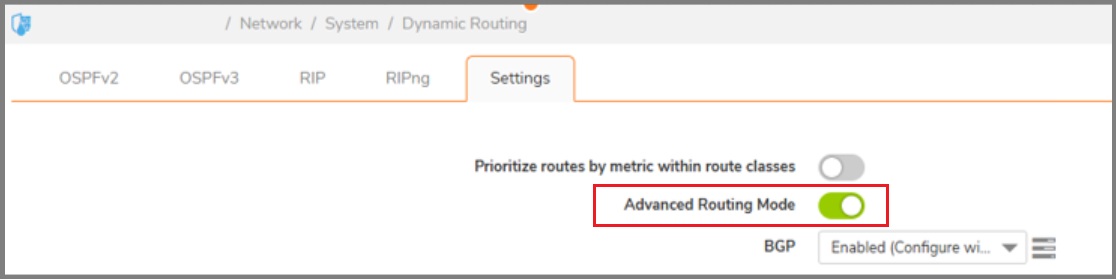
- Network > System > Dynamic Routing > Enable Advanced Routing
- Network > System > Dynamic Routing > Enable BGP (Configure with CLI)
- Enable SSH on the WAN interface. Enabled on both for testing.
- Optional: Create a temp local admin for using with Putty for allowing connectivity through ssh and web interface simultaneously.
- Device > Users > Local Users and Groups > Add User
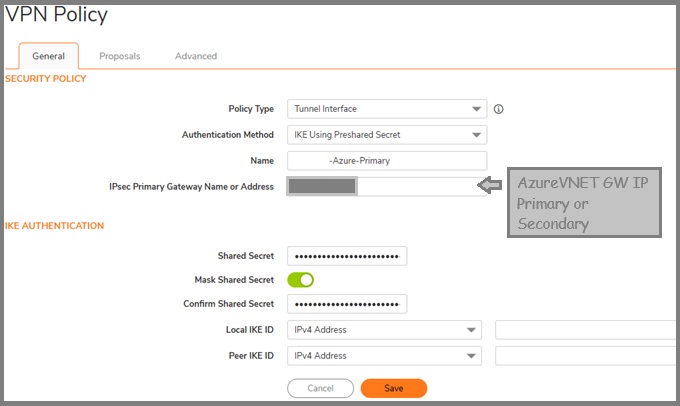
- Policy Type: Tunnel Interface
- IKE Using Preshared Secret
- Name: Office-Azure-Primary OR Office-Azure-Secondary
- IPsec Primary Gateway Name or Adress: Azure VNETGW Primary IP OR Azure VNETGW Secondary IP
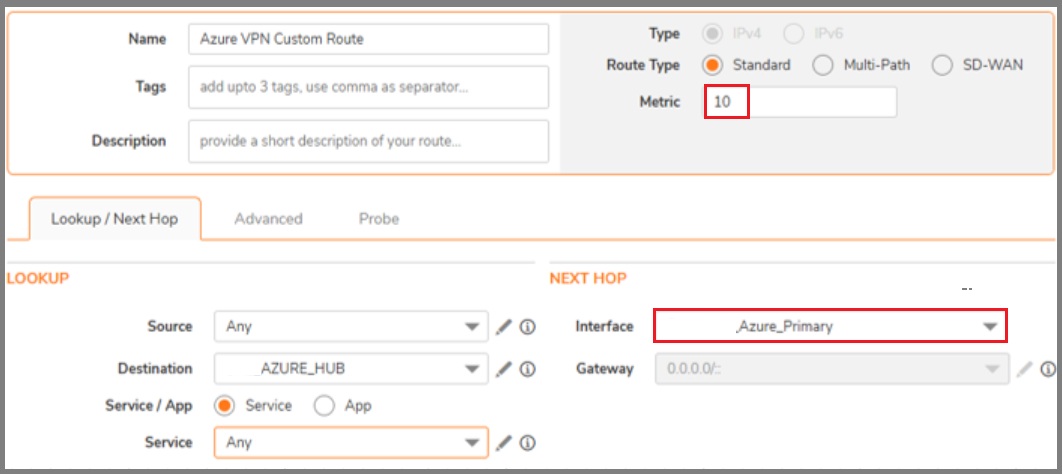
- Policy > Rules and Polices > Routing Rules Custom routes must be created to allow outbound priority on one of the VPN tunnels. The routing from the Azure side is configured later during the BGP cli configuration.
SonicWall Setup
VPN Policies
-
VPN Policies must be created first in order to be referenced by the Virtual Interfaces in the next step. There should be two once completed.
Virtual Interfaces
-
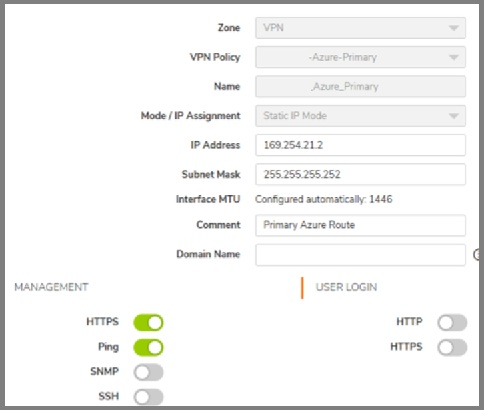
Create a VPN Tunnel Interface for each circuit. There should be two once completed. These items are the local BGP items that will be referenced by Azure.
The Subnet Mask should be '255.255.255.252' if using the network design plan from other guide.
Custom Routing
Note in the example below, the lower metric is applied to the primary route.
Once again; There should be two once completed.
Azure Setup
-
The steps below are notes on how items should look for a single deployment, not so much about 'how' to implement these options.
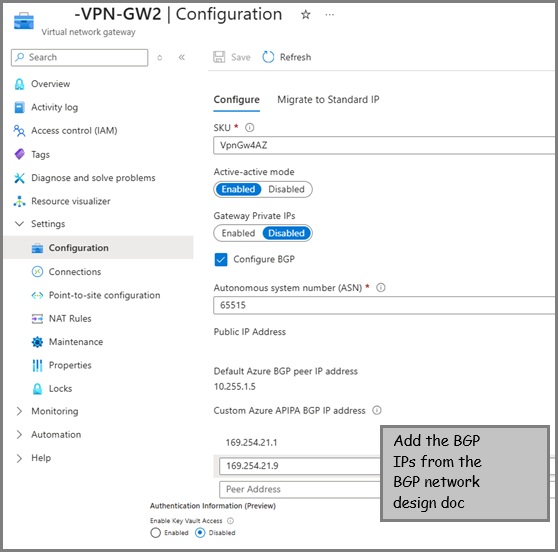
- Active-Active: Enabled
- Autonomous system number (ASN) : 65515 (Default ASN for Azure VNET GWs)
- Custom Azure APIPA BGP IP ADDRESS : 169.254.21.1
- Second Custom Azure APIPA BGP IP ADDRESS : 169.254.21.5
- And other IPs as planned from your BGP network design doc ...
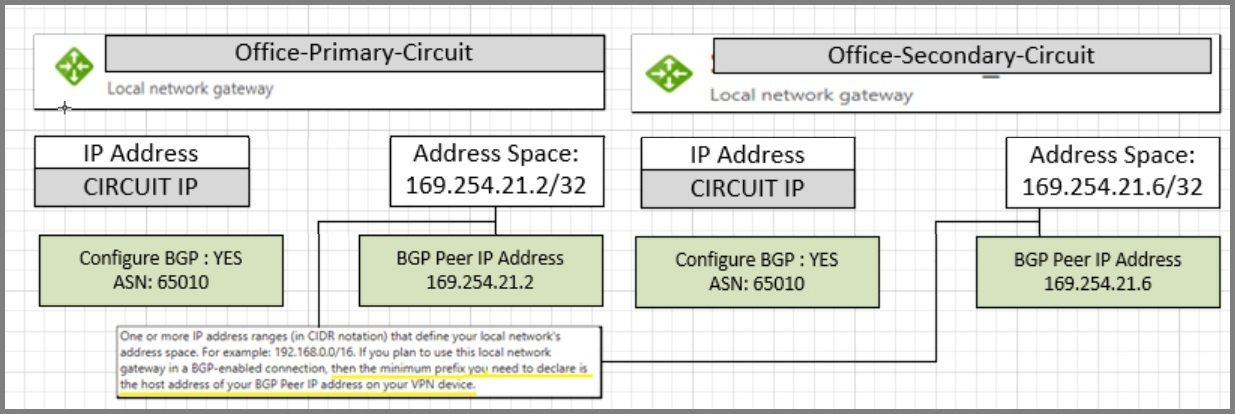
- Configure BGP : YES
- ASN : 65010
- BGP Peer IP Address : 169.254.21.2
- Address Space : 169.254.21.2/32
- Configure BGP : YES
- ASN : 65010
- BGP Peer IP Address : 169.254.21.6
- Address Space : 169.254.21.6/32
- BGP: Enabled
- BGP: Enabled
Virtual Network Gateway
Local Network Gateway A
Local Network Gateway B
Design layout for Initial BGP Failover network.
Connection A
Connection B
SonicWall Setup CLI - BGP Configuration
-
Connect Via Putty and make the following things:
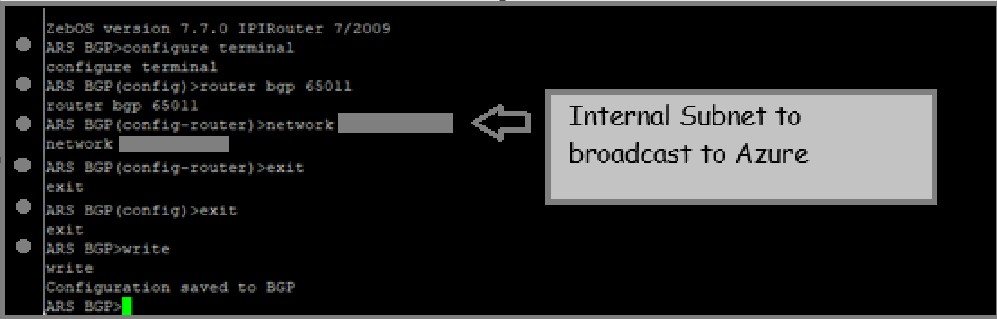
- Custom BGP
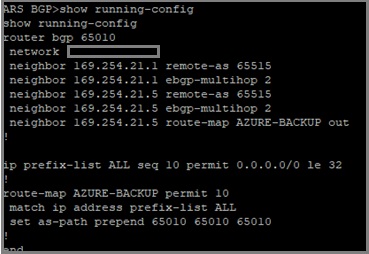
- Custom Route Map (This is required for Azure to 'learn' the primary/secondary route prefence
- Create 1st BGP Neighbor
- Create 2nd BGP Neighbor
- Save and Exit, as needed to return to top layer
- Export Summary to review with example below
               config

               routing

               bgp

               configure terminal

               ip prefix-list ALL seq 10 permit 0.0.0.0/0 le 32

               router bgp (YOUR_ASN)

               network (SUBNET)

               exit

               exit

               write
                config

                routing

                bgp

                configure terminal

                route-map (ROUTE-MAP-NAME) permit 10

                match ip address prefix-list ALL

                set as-path prepend (YOUR_ASN)(YOUR_ASN)(YOUR_ASN)

                exit

                exit

                write
                config

                routing

                bgp

                configure terminal

                router bgp (YOUR_ASN)

                neighbor (AZURE_PEER_IP_1) remote-as (AZURE_ASN)

                neighbor (AZURE_PEER_IP_1) ebgp-multihop 2
                neighbor (AZURE_PEER_IP_2) remote-as (AZURE_ASN)

                neighbor (AZURE_PEER_IP_2) ebgp-multihop 2

                neighbor (AZURE_PEER_IP_2) route-map (ROUTE-MAP-NAME) out
                exit

                exit

                writer
                config

                routing

                bgp

                show running-config
Troubleshooting Tips
- BGP Running Config Example:
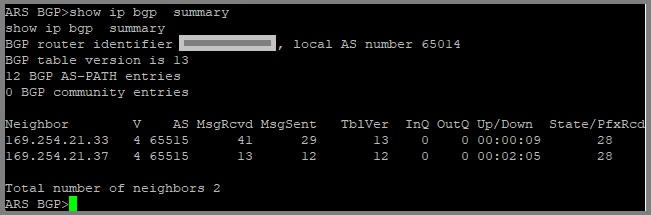
- SHOW IP BGP SUMMARY
- Dynamic Routes not populating in SonicWall?
- VPN Policy not turning green for any apparent reason. Maybe related to selecting the wrong tunnel interface during creation
- Needed to add custom BGP IPs to the connections used by the additional offices.
neighbor [neighbor_ip] update-source [tunnel_interface_name] - Might do something. Not sure why this gets stuck.
Recommended Reading
- PlaceHolder