Printer Mapping Cleanup
Synopsis: Quick instructions for removing printer mappings via powershell
Published May 12th, 2026
Last Modified: May 12th, 2026
Intro: Printer removal tips to use along deployments of Intune printer packagers. To be used for removing older printer mappings that referenced the older printer server.
Published May 12th, 2026
Last Modified: May 12th, 2026
Intro: Printer removal tips to use along deployments of Intune printer packagers. To be used for removing older printer mappings that referenced the older printer server.
Quick Run Down
-
1.) Audit Print Server Usage
2.) Update Script
3.) Troubleshooting
Audit Print Server Usage
-
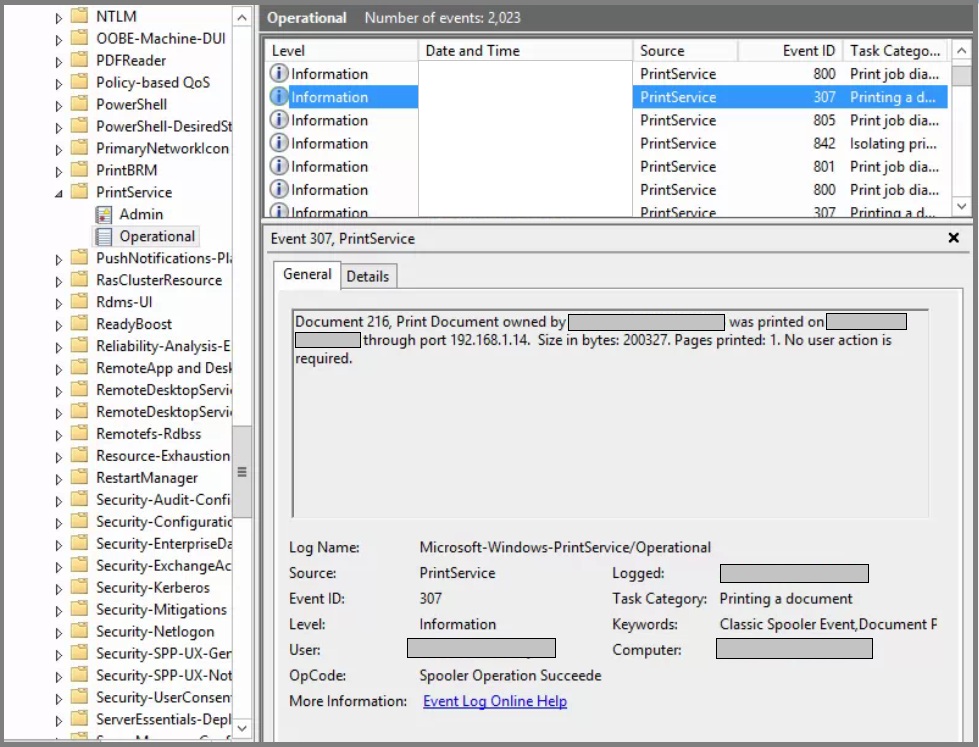
You can look through event viewer on the print server to determine if print jobs are still being routed through the server.
Navigate to: Applications and Services Logs > Microsoft > Windows > PrintService > Operational
Look for Event ID: 307
Update Script
-
Use the following template, and update with printer share names. Can reference the print server. Save as .ps1 file to deploy via Intune.
    		Remove-Printer –Name “Printer A ShareName”

    		Remove-Printer –Name “Printer B ShareName”

    		Remove-Printer –Name “Printer C ShareName”
Troubleshooting Tips
- None. You're on your own, Bro.