DUO - MFA Proxy for VPN
Synopsis: Deploy Duo MFA Proxy Service into a client environment for protection of SSLVPN connection with an on prem firewall.
Published February 7th, 2026
Last Modified: February 7th, 2026
Intro: An authentication proxy service can be used to redirect RADIUS queries back to Duo for MFA. This can be used to add MFA to vpn connections that can use RADIUS for auth. (Both Meraki, and SonicWall.)
Published February 7th, 2026
Last Modified: February 7th, 2026
Intro: An authentication proxy service can be used to redirect RADIUS queries back to Duo for MFA. This can be used to add MFA to vpn connections that can use RADIUS for auth. (Both Meraki, and SonicWall.)
Quick Run Down
-
1.) Install Duo Proxy Service
2.) Configure NPS
3.) Configure Duo Proxy
4.) Configure VPN Appliance
5.) Encrypt Configuration File
6.) Troubleshooting Tips
Install Duo Proxy Service
- https://dl.duosecurity.com/duoauthproxy-latest.exe
- Run the Duo installer “as Administrator”
- Complete the simple deployment wizard
Download the latest version of the installer into the customer environment
Configure NPS
-
DUO Proxy requires it’s own shared secret, along with the shared secret from the current Firewall vpn. If a NPS entry for the VPN does not yet exist.
Note: RADIUS passkeys cannot be longer than 31 characters.
-
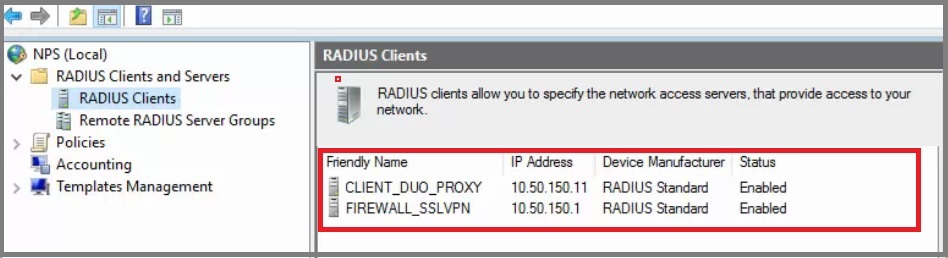
Create the following RADIUS Client and Network Policies:
-
A.) Configure a new RADIUS client.
-
Friendly Name: ‘CLIENT_DUO_PROXY’
IP: Enter the Server IP the proxy is being installed on.
Shared Secret: Enter the secret key from the CLIENT_DUO_PROXY
Do NOT enable the Message-Authenticator attribute
B.) If Required: Configure a second RADIUS client for the SSLVPN.
-
Friendly Name: ‘FIREWALL_SSLVPN’
IP: Enter the local Gateway IP to the Firewall used for VPN connection.
Shared Secret: Enter the secret key from the FIREWALL_SSLVPN
Do NOT enable the Message-Authenticator attribute
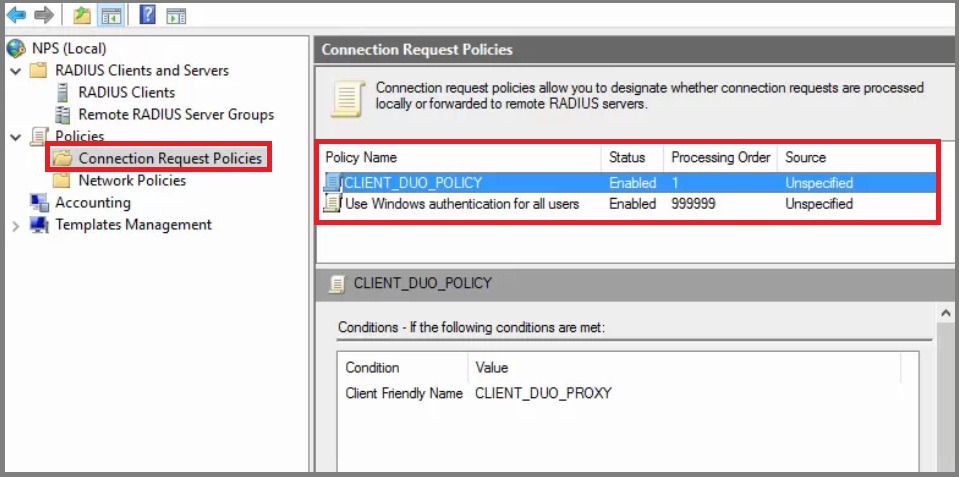
C.) Configure a new Connection Request Policy:
-
Policy Name: ‘CLIENT_DUO_POLICY’
Condition: Client Friendly Name : ‘CLIENT_DUO_PROXY’
D.) Configure a new Network Policy or use existing:
-
Policy Name: ‘FIREWALL_SSLVPN_POLICY’
Condition: 'Domain Users' or A ‘VPN Users’ group agreed with POC
Authentication: Add .. “EAP-MS-CHAP v2”
Encryption: Basic, Strong and Strongest
Configure Proxy Service
-
Launch Duo Proxy Manager
Replace the Configuration text with the following place holder text: (More info on each item below:)
            [radius_client]

            host=NPS_SERVER_IP

            secret=NPS_SHARED_SECRET


            [radius_server_auto]

            ikey=DUO_INTEGRATION_KEY

            skey=DUO_SECRET_KEY

            api_host=DUO_API_HOSTNAME

            radius_ip_1=IP_ADDRESS/RANGE_RADIUS_CLIENTS

            radius_secret_1=SHARED_SECRET

            failmode=safe

            client=radius_client

            port=11812
Configure VPN Appliance
-
PLACEHOLDER TEXT
Encryption of Keys
-
After successful testing, you should return to encrypt the config file. This can be done with a 1 line command:
"C:\Program Files\Duo Security Authentication Proxy\bin\authproxy_passwd.exe" --whole-config
Troubleshooting Tips
-
If you are having issues getting Duo authentication to work for an application via the Proxy.
Review NPS logs to see if it is getting the connection attempts or not.
Review Duo logs for the user you are testing with to see if the connection attempts are being recorded there.
Review Event Viewer for source "DuoAuthProxy"
Use a log viewer to monitor "C:\Program Files (x86)\Duo Security Authentication Proxy\log\authproxy.log" in real time.
This log will likely give you the most useful information about why an authentication attempt is failing.
Try putting a using a copy of authproxy.cfg without encrypted strings.
Frustratingly easy to introduce typos into the config file
If it works with the secrets in clear text then the config is valid other than the encrypted strings.
Some characters are reserved and can cause unexpected behaviour during a RADIUS authentication request.
If you see the following in the proxy logs it may actually be suggesting an issue with encrypted strings and not authentication methods in use.
If you see the following in the Duo Proxy logs but think you are configured for MSCHAPv2, try generating a new shared secret.
https://help.duo.com/s/article/4362?language=en_US