Converting AzureP2S script for RMM deployment
Published December 22, 2025
Last Modified: May 24th, 2026
Intro: There are a handful of changes that must be made to the VPN deployment script in order for it to function properly for all users when deployed by RMM as a system user.
These instructions are based off using the default 'VpnProfileSetup.ps1' script available for download from Azure when deploying a certifcate based P2S VPN. Downloading this prebuilt VPN configuration is not covered by this material.
Issue Corrections: These steps address several of the issues with the default profile deployment script such as;
Quick Run Down
0.) Cert creation instructions1.) Deploying VPN for All Users
2.) -DnsSuffix
3.) Pbk\rasphone.pbk file locations
4.) UseRasCredentials
5.) IPInterface Metric
Creating the Certificate
-
Honorable mention; Cert creation through powershell:
https://learn.microsoft.com/en-us/azure/vpn-gateway/vpn-gateway-certificates-point-to-site
All User Connections
The default script is designed to run from user prospective, and will only install the VPN profile to the current user.
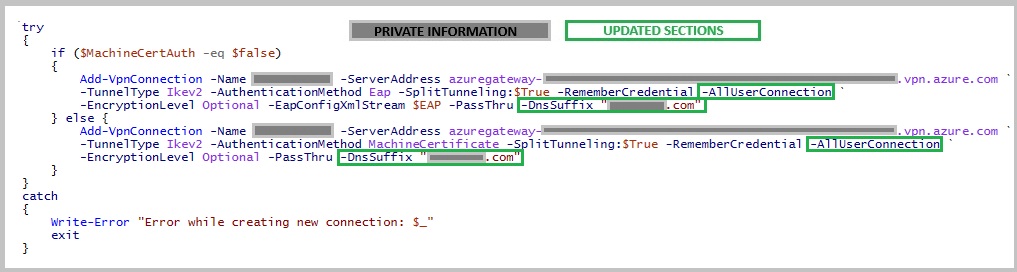
There are two 'Add-VpnConnection' commands in the prebuilt script that need to be updated to include the '-AllUserConnection' parameter.
Adding this parameter modifies the script in such a way that admin privledges are now required to deploy it.
This will correct the issue of the deployed VPN not being available for other user profiles.
screenshot further below
DnsSuffix
-
Adding in the DnsSuffix for the domain will help with DNS issues accross SMB shares or domain joining. This can be added through the network adapter settings when troubleshooting connections.
It can also be during the initial deployment by appending the '-DnsSuffix "contoso.com" ' parameter to both deployment scripts in the default deployment
This will help with domain join issues while on the vpn. There are some other items related to 'Interface Metric' that you could look into if this is the reason you're here.
Pbk\rasphone.pbk
-
After the VPN profile is created. The default script outlines some 'rasphone.pbk' file changes. This 'phonebook' file has some additional configuration options for the vpn profile.
- Update all the filepaths to a new location. When the vpn is installed for '-AllUserConnection', the .pbk file exist in a new location.
- Ensure you update the filepath in both the 'Get-Content' and the 'Set-Content' commands.
C:\ProgramData\Microsoft\Network\Connections\Pbk\rasphone.pbk
This notebook file can be opened in notepad, as a text file, to see more details. It also has a gui interface.
You need to make the following adjustments to the VPNprofileSetup.ps1 file;
UseRasCredentials
When using machine certificate auth, issues can arise when accessing SMB shares while on the VPN.
You can instruct the computer to use the user auth for these connections by updating the UseRasCredentials parameter in the rasphone.pbk file.
This can be done during the deployment by adding this additional line to the default
This can assist with SMB access issues while using the Azure p2s VPN
((Get-Content -Raw -path 'C:\ProgramData\Microsoft\Network\Connections\Pbk\rasphone.pbk') -replace "(?s)(.*)UseRasCredentials=1(.*)","`$1UseRasCredentials=0`$2") | Set-Content -path 'C:\ProgramData\Microsoft\Network\Connections\Pbk\rasphone.pbk'
IP Interface Metric
If you still encounter DNS not resolving publically instead of internally, there may be an issue with the IP Interface Metrics for your connections.
This can be checked quickly by;
Get-NetIPInterface | Sort-Object InterfaceMetric
If your Azure VPN's IP Metric is equal to other values in this table, it may not have priority for dns resolution. (Despite our earlier instructions.)
You can set it manually, via command line;
                Set-NetIPInterface `

                  -InterfaceAlias "Interface Name" `

                  -InterfaceMetric 05
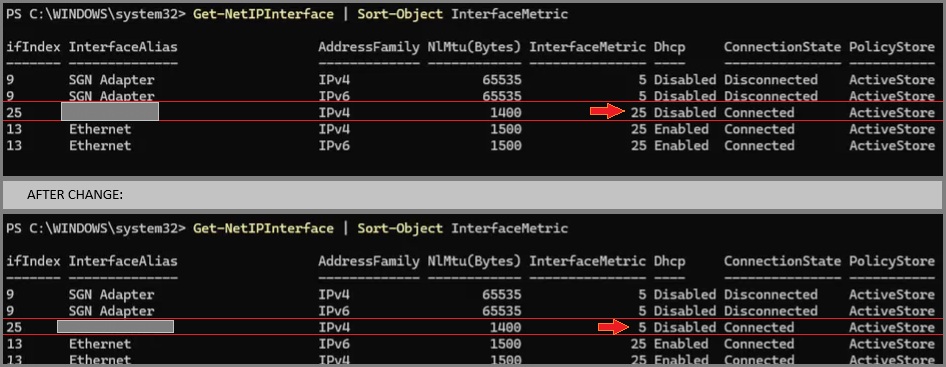
If this corrects your issue with DNS, add the following to your deployment script
((Get-Content -Raw -path 'C:\ProgramData\Microsoft\Network\Connections\Pbk\rasphone.pbk') -replace "(?s)(.*)IpInterfaceMetric=0(.*)","`$1IpInterfaceMetric=5`$2") | Set-Content -path 'C:\ProgramData\Microsoft\Network\Connections\Pbk\rasphone.pbk'
This switches the default value from '0' (automatic), to a default "5".
Troubleshooting Tips
- All the above, Silly.